Information |
| Login |
| Contact |
| Privacy/Terms of Use |
Flags |
MrNussbaum Premium Silver offers school and home user the opportunity to earn world flags for their time on the site. The world flags are images of world flags that appear in student flag portfolios. There are 175 total different world flags that can be earned. To learn more, see the help topics below.
|
Students earn a world flag for every five games they play on MrNussbaum.com in which they achieve a score that is not zero. |
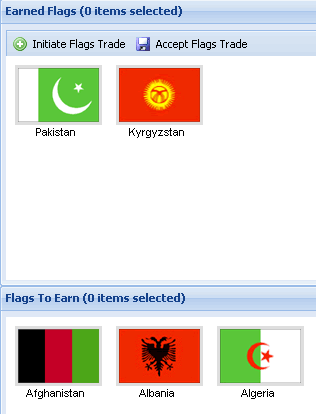
Step 1.) Log on as a school user and click the "flags" icon. Student flags are located in the top panel under "earned flags." The panel below shows all flags yet to be earned.
|
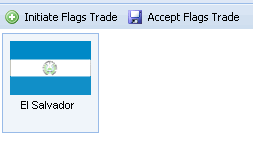
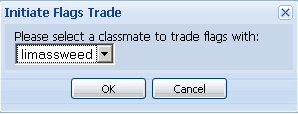
Step 1.) Click on a flag that you are willing to trade and then click "initiate flags trade." This flag will be the flag you offer in the trade. Then, select the classmate you want to trade with and click "ok."
|
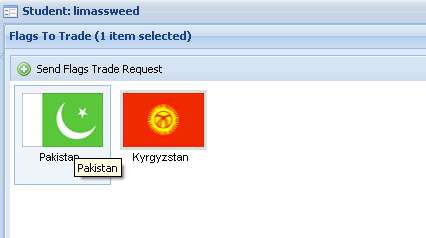
Step 2.) The flag portfolio of the selected classmate will appear. Click on the flag or flags you want to receive in exchange for the one you offered in the trade. In this case you offered to trade your El Salvador flag, and you are asking Limassweed for his Pakistan flag. Then, click "send flags trade request." You will have to wait until the trade is accepted or rejected by the person you offered it to. Note - when you offer a flag in a trade it becomes locked. This means, you cannot offer it again until the previous trade involving this flag is rejected.
|
Step 1.) Log in as a school user and click the "flags icon." |
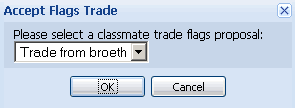
Step 2.) Click on "accept flags trade," and then select the actual trade from the menu and click "ok."
|
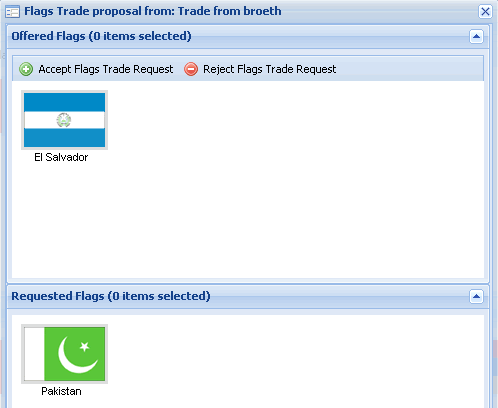
Step 3.) The actual trade will appear in a new window with all flags involved in the trade visible. Click "accept" or "reject."
|
Step 4.) The trade is complete. In this case, the trade was accepted.
|