Information |
| Login |
| Contact |
| Privacy/Terms of Use |
Intra-Class Tournaments |
Intra-class Tournaments are tournaments in which one class battles another. Teachers can choose to allow one of their classes to battle another in any of the games, or, can challenge any other class registered on MrNussbaumPremium in that same grade. Intra-class Tournaments are scored differently than regular tournaments. The class with the highest average score wins. This enables classes of different sizes to battle each other. Please read the directions below to set up and monitor your Intra-class tournament.
|
| Step 1.) Log on as a teacher and click the "Intra-class tournament " icon. |
Step 2.) Click on " Add New Tournament"
|
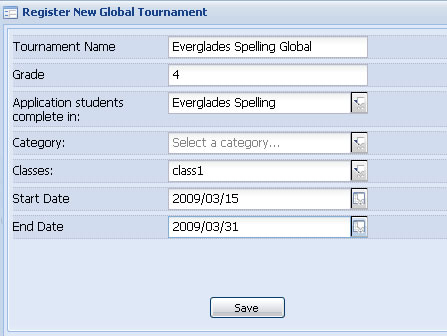
Step 3.) Fill out the information for the tournament. Choose a date in which students can access the tournament and the last day they can access the tournament. Click save when done. Also, select the class that you want to participate in the tournament. Note - ignore the "Category" menu unless making a speed math tournament. If using speed math, indicate the category (+, -, x, or /). Students must select the same category when participating in the Speed Math tournament, or the score will not get recorded. For example, if you select addition, students will have to select addition in the tournament.
|
Step 1.) Click "the Deploy Tournament" button and select the tournament you want to deploy.
|
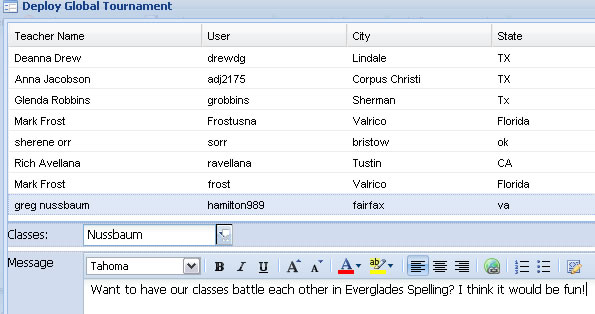
Step 2.) Click to select a teacher and then the teacher's class (from the drop down menu that will appear) to battle your class. You can also author a note in the "message" section. Then click "deploy." You will have to wait until that teacher accepts the challenge before proceeding with the tournament. Please note - not all teachers will respond to challenges.
|
| Step 1.) It is possible that a teacher might challenge your class to an Intra-class tournament. Click on the "Intra-class tournaments icon" |
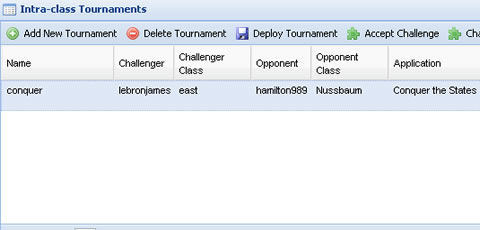
Step 2.) Check the top of the page for any challenges. In this case, the class has been challenged by "Lebron James." He has chosen his class named "east" to challenge the "Nussbaum" class of "Hamilton989". To accept a challenge such as this, click "accept challenge." Once you accept, the tournament status is changed to "active" and your students can participate.
|
|
How to set up an Intra-class Tournament between two of your classes |
Step 1.) Follow steps 1-3 from "How to Set up an Intra-class Tournament." |
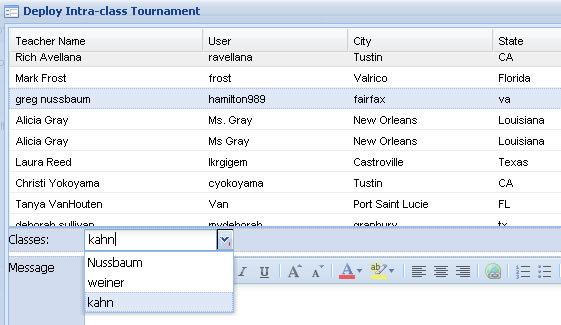
Step 2.) Follow steps one and two from "How to Deploy an Intra-class Tournament," but when you are browsing for a teacher and class to select, select yourself and the class you would like the first class to battle. In this case, I have selected my own account in the "deploy tournament" window and have selected class "Kahn" for class "Nussbaum" to battle against. So one of my classes "Nussbaum" will battle another of my classes "Kahn" in Where in the USA is Mr.Nussbaum? There is no need for me to type a message because both classes are registered with me (unless I would want to send myself a message).
|
Step 3.) Because I set up a tournament between two of my classes, after the tournament is deployed, I must click the "accept challenge" button. Now, your students are ready to participate.
|
Step 1.) Log on as a teacher and click the Intra-class Tournament icon |
|
Step 2.) Click to select the tournament of interest. Scores wil show up at the bottom of the screen. In the Intra-class Tournament, the class with the higher AVERAGE score wins.
|
Step 1.) Log in as a student and click the "Intra-class tournament " icon. |
|
Step 2.) Click "Play in an Intra-class Tournament"
|
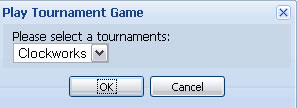
Step 3.) Select the tournament from the menu and play game. Your score will automatically get entered into the tournament when you complete the game. Your score will be combined with the scores of your classmates in an average class score.
|