MrNussbaum Premium Silver features a comprehensive messaging system in which teachers can send messages to students and students can send messages to teachers or their classmates. Please note that student-to-student messaging is disabled by default. Teachers must enable this kind of messaging on a student-by-student basis. For specific instructions, please see below:
Step 1.) Log
on as a teacher and click the "messages" icon.
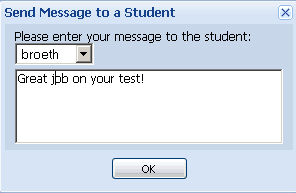
Step 2.)Click on "Send Message to Student."
Step 3.) Select the student to send a message to and type
message. Click "ok."
How to Read Messages
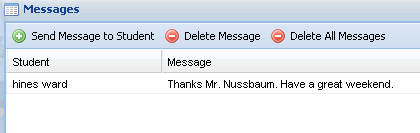
Step 1.) Log in as a teacher and click the
messages icon.
Step 2.) Student messages will appear.
How do I delete messages?
Step 1.) Log in as a teacher and click the "messages"
icon.
Step 2.) Click to select the message to delete, and then
click "delete message." Or, click "delete all messages."
Enabling/Disabling Messages
Step 1.) Log in as a teacher and click on the "STUDENTS"
icon. By default, messages are enabled from teacher to
student and from student to teacher.
Step 2.) To enable or disable students from sending or
receiving messages from each other, click to select the student
of interest and click "enable/disable messages." When you
open your account, this type of messaging is disabled by
default so you will have to enable it for each student. Please
note I am not responsible for the content sent between
students, so use good judgment when enabling messages.
Inappropriate messaging constitutes a terms of service violation
and may result in account suspension.
Sending and Receiving Messages from Classmates
* note - this feature must be enabled by
the teacher. See instructions above
Step 1.) Log on as a student and click on the "messages"
icon.
Step 2.) Click the "classmates messages" tab.
Step 3.) Messages from your classmates will appear.
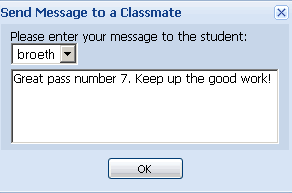
Step 4.) To send a message to a classmate, click "send message to classmate."
Step 5.) Type the message and select the classmate.